Overview
The Card Session SDK is a JavaScript library that enables merchants to accept credit card payments securely through DOKU's payment gateway. Simply include the SDK in your webpage and start processing payments with just a few lines of code.
Secure by Default
RSA encryption and environment-specific security configurations
Simple Integration
Just include script tag and initialize
Zero Configuration
Pre-configured for your environment, no complex setup needed
Multi-Environment Support
Separate SDK URLs for Sandbox and Production
Card Validation
Built-in Luhn validation, brand detection, expiry and CVV checks
Fraud Prevention
Automatic device fingerprinting for enhanced security
Integration Flow
The efficient payment flow involves four main steps: backend session, data collection (SDK), 3DS authentication, and backend confirmation.
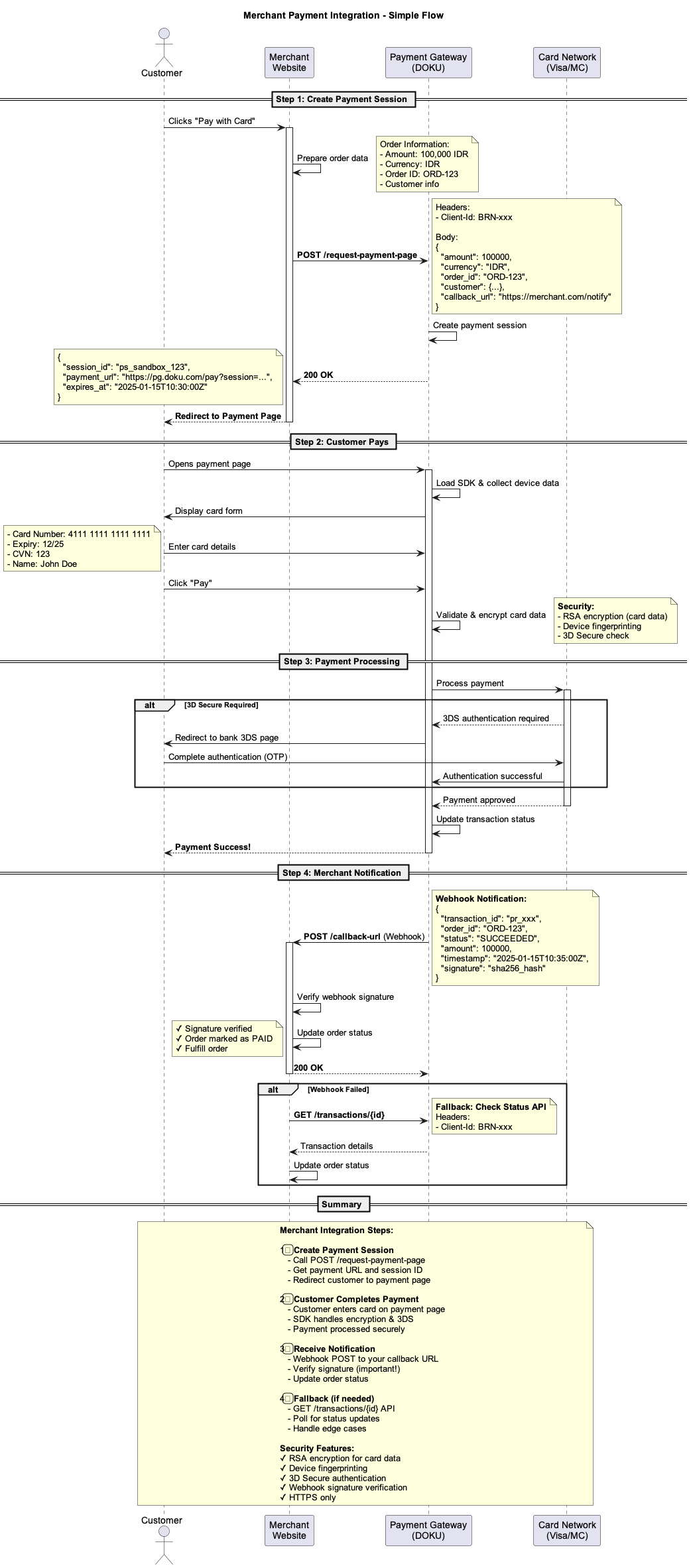
- Customer initiates payment - User fills payment form on your website
- Generate payment session - Your backend calls DOKU API to create a session
- Return session ID to frontend - Session ID is passed to the browser
- Collect card data - SDK validates and encrypts card information
- Submit to DOKU - Encrypted data sent to DOKU payment gateway
- 3DS authentication - User completes Strong Customer Authentication if required
- Payment completion - Result returned to your backend via webhook
This SDK handles steps 4-6. Your backend is responsible for generating the payment session (step 2) and processing the final webhook (step 7).
Quick Start
1. Include the SDK
Add the DOKU Card Session SDK to your HTML page. Contact DOKU support to get the SDK URL for your environment:
<!-- For sandbox/testing environment -->
<script src="https://cdn.doku.com/card-session/sandbox/v2.0.0/card-session.js"></script>
<!-- For production environment -->
<script src="https://cdn.doku.com/card-session/production/v2.0.0/card-session.js"></script>
Each SDK URL is environment-specific. Always use sandbox URL for testing and production URL for live payments. Never use sandbox SDK in production!
2. Initialize the SDK
Initialize
// Initialize SDK (environment is pre-configured in the SDK file)
PG.init().then((sdkInstance) => {
// Verify environment
console.log('Environment:', PG.getEnvironment());
console.log('API URL:', PG.getApiBaseUrl());
// Important: Chain the Device Data API status check
return sdkInstance.isDeviceDataApiSuccessful();
})
.then(() => {
// This block runs ONLY if both initialization AND the Device Data API check succeeded.
// Proceed with secure payment flow (e.g., enabling the Pay button)
document.getElementById('payButton').disabled = false;
})
.catch((error) => {
// This block catches all failures (critical init error OR Device Data API error).
// Proceed with secure payment flow (e.g., disable payment and alert the user/system)
document.getElementById('payButton').disabled = true;
});
3. Process Payment
Collect and submit card data to DOKU:
const cardData = {
payment_session_id: 'ps_sandbox_xxxxxxxxxxxxx',
card_number: '4111111111111111',
expiry_month: '12',
expiry_year: '25',
cvn: '123',
cardholder_first_name: 'John',
cardholder_last_name: 'Doe',
cardholder_email: 'john@example.com'
};
PG.payment.collectCardData(cardData, function(error, response) {
if (error) {
console.error('Payment failed:', error.message);
} else if (response.requires_action) {
// 3DS authentication required
window.location.href = response.action_url;
} else {
console.log('Payment successful!', response);
}
});
Integration Guide
1. Generate Payment Session
Before collecting card data, you must generate a payment session from your backend. This creates a secure session with DOKU and returns a session ID.
Learn how to generate a payment session by following the Generate Payment URL guide in the DOKU Developer Documentation.
Backend Example (Node.js):
// Your backend API endpoint
app.post('/api/create-payment-session', async (req, res) => {
const response = await fetch('https://api.doku.com/payment-sessions', {
method: 'POST',
headers: {
'Authorization': 'Bearer YOUR_SECRET_KEY',
'Content-Type': 'application/json'
},
body: JSON.stringify({
amount: 100000,
currency: 'IDR',
customer: {
name: 'John Doe',
email: 'john@example.com'
},
// Additional session parameters...
})
});
const data = await response.json();
res.json({
session_id: data.payment_session_id
});
});
Frontend - Fetch Session ID:
// Call your backend to get session ID
const response = await fetch('/api/create-payment-session', {
method: 'POST',
headers: { 'Content-Type': 'application/json' },
body: JSON.stringify({
amount: 100000,
customer_id: '12345'
})
});
const { session_id } = await response.json();
console.log('Payment Session ID:', session_id);
2. Initialize SDK
Initialize the SDK with your DOKU Client ID. The environment and API URL are already configured in the SDK file you included:
// Initialize
PG.init().then((sdkInstance) => {
// Verify environment
console.log('Environment:', PG.getEnvironment());
console.log('API URL:', PG.getApiBaseUrl());
// Important: Chain the Device Data API status check
return sdkInstance.isDeviceDataApiSuccessful();
})
.then(() => {
// This block runs ONLY if both initialization AND the Device Data API check succeeded.
// Proceed with secure payment flow (e.g., enabling the Pay button)
document.getElementById('payButton').disabled = false;
})
.catch((error) => {
// This block catches all failures (critical init error OR Device Data API error).
// Proceed with secure payment flow (e.g., disable payment and alert the user/system)
document.getElementById('payButton').disabled = true;
});
The environment (sandbox/production) is determined by which SDK URL you included in your HTML. You don't need to configure it in your code.
3. Validate Card Data
Use built-in validation before submission:
// Validate card number
if (!PG.card.validateCardNumber(cardNumber)) {
alert('Invalid card number');
return;
}
// Detect card brand
const brand = PG.card.detectBrand(cardNumber);
console.log('Card brand:', brand); // 'visa', 'mastercard', 'amex', 'discover', 'jcb', 'dinersclub', 'unionpay'
// Validate expiry
if (!PG.card.validateExpiry(month, year)) {
alert('Invalid or expired card');
return;
}
// Validate CVV
if (!PG.card.validateCvv(cvv, brand)) {
alert('Invalid CVV');
return;
}
4. Submit Payment
Submit the card data with the session ID from step 1:
const cardData = {
// Required: Session ID from your backend
session_id: session_id,
// Required: Card information
card_number: '4111111111111111',
expiry_month: '12',
expiry_year: '25',
cvv: '123',
// Required: Cardholder information
card_holder_first_name: 'John',
card_holder_last_name: 'Doe',
// Optional but recommended
card_holder_email: 'john@example.com',
card_holder_phone_number: '+6281234567890',
// Optional: Billing information
billing_information: {
address: '123 Main St',
city: 'Jakarta',
postal_code: '12345',
country: 'ID'
}
};
PG.payment.collectCardData(cardData, function(error, response) {
if (error) {
console.error('Error:', error.message);
showErrorMessage(error.message);
} else {
console.log('Payment completed!');
console.log('Payment Request ID:', response.payment_request_id);
showSuccessMessage('Payment successful!');
}
});
5. Handle 3D Secure Authentication
When 3DS is required, the SDK provides an action URL for authentication:
// After 3DS, user returns to your callback URL
const urlParams = new URLSearchParams(window.location.search);
const paymentRequestId = urlParams.get('payment_request_id');
const status = urlParams.get('status');
if (paymentRequestId) {
if (status === 'success') {
// Verify with your backend
verifyPaymentStatus(paymentRequestId);
} else {
showErrorMessage('Payment authentication failed');
}
}
Always verify the payment status with your backend using DOKU's webhook before marking the order as paid. Never rely solely on client-side confirmation.
API Reference
PG.init()
Initialize the SDK with client configuration.
PG.init();
// Environment and API URL are pre-configured (no setup needed)
PG.getEnvironment()
Get the current environment (read-only, pre-configured in SDK).
const env = PG.getEnvironment();
// Returns: 'sandbox' or 'production'
PG.getApiBaseUrl()
Get the current API base URL (read-only, pre-configured in SDK).
const url = PG.getApiBaseUrl();
// Returns: 'https://sandbox.doku.com' or 'https://app.doku.com'
PG.getEnvironmentConfig()
Get complete environment configuration.
const config = PG.getEnvironmentConfig();
// Returns: { environment: 'sandbox', apiBaseUrl: '...', buildTime: true }
PG.card.validateCardNumber(cardNumber)
Validate card number using Luhn algorithm.
const isValid = PG.card.validateCardNumber('4111111111111111'); // true
PG.card.detectBrand(cardNumber)
Detect card brand from card number.
const brand = PG.card.detectBrand('4111111111111111');
// Returns: 'visa', 'mastercard', 'amex', 'discover', 'jcb', 'dinersclub', 'unionpay'
PG.card.validateExpiry(month, year)
Validate card expiry date.
const isValid = PG.card.validateExpiry('12', '25'); // true/false
PG.card.validateCvv(cvv, brand)
Validate CVV code.
const isValid = PG.card.validateCvv('123', 'visa'); // true
PG.card.formatCardNumber(cardNumber)
Format card number with spaces.
const formatted = PG.card.formatCardNumber('4111111111111111');
// Returns: '4111 1111 1111 1111'
PG.payment.collectCardData(cardData, callback)
Submit payment with encrypted card data.
PG.payment.collectCardData(cardData, function(error, response) {
if (error) {
// Handle error
} else {
// Payment successful
}
});
PG.getDeviceData()
Manually trigger device data collection.
PG.collectDeviceData();
PG.isDeviceDataReady()
Check if device data collection is complete.
if (PG.isDeviceDataReady()) {
const deviceData = PG.getDeviceData();
}
Test Cards
Use these test cards in sandbox environment:
| Brand | Card Number | Expiry | CVV | Note |
|---|---|---|---|---|
| Visa | 4111 1111 1111 1111 | Any future date | 123 | Successful Transaction / 3DS Success |
| Mastercard | 5555 5555 5555 4444 | Any future date | 123 | Successful Transaction / 3DS Success |
| Amex | 3782 822463 10005 | Any future date | 1234 | Successful Transaction / 3DS Success |
| Discover | 6011 1111 1111 1117 | Any future date | 123 | Successful Transaction / 3DS Success |
| JCB | 3566 0020 2036 0505 | Any future date | 123 | Successful Transaction / 3DS Success |
| Diners Club | 3056 9309 0259 04 | Any future date | 123 | Successful Transaction / 3DS Success |
| UnionPay | 6221 2600 0000 0000 | Any future date | 123 | Successful Transaction / 3DS Success |
In sandbox, use any future expiry date and any CVV. Different card numbers may trigger different 3DS scenarios.
Live Demo
Try out the Card Session SDK with our interactive demo. Experience the complete payment flow including card validation, device data collection, and 3D Secure authentication.
💡 Demo Features:
- Interactive payment form with real-time validation
- Card brand detection and formatting
- Device fingerprinting data collection
- 3D Secure authentication flow simulation
- Network request monitoring in console
- Test cards pre-filled for quick testing
⚠️ Sandbox Environment: The demo uses sandbox environment with test data. No real transactions will be processed.
Complete Integration Example
Here's a complete HTML page showing how to integrate the Card Session SDK:
<!DOCTYPE html>
<html>
<head>
<title>Payment Page</title>
</head>
<body>
<h1>Complete Your Payment</h1>
<form id="paymentForm">
<label>Card Number:</label>
<input type="text" id="cardNumber" placeholder="4111 1111 1111 1111" required>
<label>Expiry:</label>
<input type="text" id="expMonth" placeholder="MM" maxlength="2" required>
<input type="text" id="expYear" placeholder="YY" maxlength="2" required>
<label>CVV:</label>
<input type="text" id="cvv" placeholder="123" maxlength="4" required>
<label>Name:</label>
<input type="text" id="firstName" placeholder="First Name" required>
<input type="text" id="lastName" placeholder="Last Name" required>
<label>Email:</label>
<input type="email" id="email" placeholder="email@example.com" required>
<button type="submit" id="payButton">Pay Now</button>
</form>
<!-- Include DOKU Card Session SDK -->
<script src="https://cdn.doku.com/card-session/sandbox/v2.0.0/card-session.js"></script>
<script>
// Initialize SDK
PG.init().then((sdkInstance) => {
return sdkInstance.isDeviceDataApiSuccessful();
})
.then(() => {
document.getElementById('payButton').disabled = false;
})
.catch((error) => {
document.getElementById('payButton').disabled = true;
});
// Handle form submission
document.getElementById('paymentForm').addEventListener('submit', async function(e) {
e.preventDefault();
// Get form values
const cardNumber = document.getElementById('cardNumber').value;
const expMonth = document.getElementById('expMonth').value;
const expYear = document.getElementById('expYear').value;
const cvv = document.getElementById('cvv').value;
// Validate before submission
if (!PG.card.validateCardNumber(cardNumber)) {
alert('Invalid card number');
return;
}
if (!PG.card.validateExpiry(expMonth, expYear)) {
alert('Invalid expiry date');
return;
}
// Get payment session from your backend
const response = await fetch('/api/create-payment-session', {
method: 'POST',
headers: { 'Content-Type': 'application/json' },
body: JSON.stringify({ amount: 100000 })
});
const { session_id } = await response.json();
// Prepare card data
const cardData = {
session_id: session_id,
card_number: cardNumber,
expiry_month: expMonth,
expiry_year: expYear,
cvv: cvv,
card_holder_first_name: document.getElementById('firstName').value,
card_holder_last_name: document.getElementById('lastName').value,
card_holder_email: document.getElementById('email').value
};
// Submit to DOKU
PG.payment.collectCardData(cardData, function(error, response) {
if (error) {
alert('Payment failed: ' + error.message);
} else {
alert('Payment successful!');
}
});
});
</script>
</body>
</html>
This example includes all the essential components: form validation, backend integration, and payment processing.
Troubleshooting
Common Issues
1. "SDK not initialized" Error
Make sure you call PG.init() before using any payment methods:
PG.init();2. "Invalid card number" Error
Validate the card number before submission:
if (!PG.card.validateCardNumber(cardNumber)) {
  alert('Please enter a valid card number');
  return;
}
3. Payment Session Expired
Payment sessions have a limited lifetime. Generate a new session if expired:
// If payment fails with "session expired" error
// Call your backend to generate a new session
const { session_id } = await generateNewPaymentSession();
4. 3DS Redirect Not Working
Ensure your 3DS callback URL is correctly configured in DOKU dashboard:
- Check callback URL is whitelisted
- Verify callback URL uses HTTPS
- Test callback URL is accessible
5. Device Data Not Collecting
Device data collection requires browser APIs. Check console for errors:
// Check if device data is ready
if (!PG.isDeviceDataReady()) {
  console.warn('Device data not ready yet');
}

// Manually trigger if needed
PG.collectDeviceData().then(data => {
  console.log('Device data collected:', data);
});
Getting Help
- DOKU Developer Documentation: https://developers.doku.com
- Technical Support: Contact your DOKU account manager
- API Status: Check DOKU status page for any service disruptions
💡 Debugging Tips:
- Open browser DevTools Console to see SDK logs (color-coded)
- Check Network tab to inspect API requests and responses
- Use sandbox test cards for testing without real transactions
- Verify payment status on your backend using webhooks
Response Code Reference
This section provides a comprehensive reference of all HTTP status codes and error codes returned by the DOKU JavaScript SDK API endpoints. Use this reference to handle API responses correctly in your integration.
- POST/credit-card/sessions/device-data
- POST/credit-card/payment-session
- POST/credit-card/charge-session
- 200 OKSuccessful Response
- 400 Bad RequestClient Error - fix and retry
- 500 Server ErrorServer Error - retry or contact support
HTTP Status Codes by Endpoint
POST /sessions/device-data
| HTTP Status | Condition | Error Code | Response Structure |
|---|---|---|---|
| 200 OK | Device data successfully saved | - | { "status": "OK" } |
| 400 Bad Request | Session ID not found or invalid | DATA_NOT_FOUND |
{ "error": { "code": "DATA_NOT_FOUND", "message": "Invalid Session Id", "type": "Data Not
                      Found" } }
|
| 400 Bad Request | Validation error (missing/invalid fields) | INVALID_PARAMETER |
{ "error": { "code": "INVALID_PARAMETER", "message": "<validation_details>", "type":
                      "Invalid Parameter" } }
|
POST /payment-session
| HTTP Status | Condition | Error Code | Response Structure |
|---|---|---|---|
| 200 OK | 3D Secure authentication required | - |
{ "message": "<msg>", "session_id": "<id>", "requires_action": true, "action_url":
                      "<3ds_url>", "authentication_id": "<auth_id>" }
|
| 200 OK | Non-3DS payment successful | - |
{ "message": "<success_msg>", "session_id": "<id>", "requires_action": true,
                      "action_url": "<callback_url>" }
|
| 200 OK | Non-3DS payment failed | - |
{ "message": "<failed_msg>", "session_id": "<id>", "requires_action": false,
                      "action_url": "<failed_url>" }
|
| 400 Bad Request | Session ID not found | DATA_NOT_FOUND |
{ "error": { "code": "DATA_NOT_FOUND", "message": "Invalid Session Id", "type": "Data Not
                      Found" } }
|
| 400 Bad Request | Failed to decrypt card data | INVALID_PARAMETER |
{ "error": { "code": "INVALID_PARAMETER", "message": "Failed Decrypt Credit Card Data", "type":
                      "Invalid Parameter" } }
|
| 400 Bad Request | Validation error | INVALID_PARAMETER |
{ "error": { "code": "INVALID_PARAMETER", "message": "<validation_details>", "type":
                      "Invalid Parameter" } }
|
| 400 Bad Request | Card BIN blocked | CARD_NUMBER_BIN_IS_BLOCKED |
{ "error": { "code": "CARD_NUMBER_BIN_IS_BLOCKED", "message": "Card Number Bin Is Blocked",
                      "type": "Card Number Bin Is Blocked" } }
|
| 400 Bad Request | Card country blocked | CARD_NUMBER_COUNTRY_IS_BLOCKED |
{ "error": { "code": "CARD_NUMBER_COUNTRY_IS_BLOCKED", "message": "Card Number Country Is
                      Blocked", "type": "Card Number Country Is Blocked" } }
|
| 400 Bad Request | Merchant blocking rule triggered | MERCHANT_BLOCKING |
{ "error": { "code": "MERCHANT_BLOCKING", "message": "Blocking By Merchant", "type": "Blocking
                      By Merchant" } }
|
POST /charge-session
| HTTP Status | Condition | Error Code | Response Structure |
|---|---|---|---|
| 200 OK | Payment charge successful | - | { "callback_url": "<merchant_callback_url>" } |
| 200 OK | Payment charge failed | - | { "callback_url": "<merchant_failed_url>" } |
| 400 Bad Request | Session not found | DATA_NOT_FOUND |
{ "error": { "code": "DATA_NOT_FOUND", "message": "PreTransactionPool Not Found", "type": "Data
                      Not Found" } }
|
| 400 Bad Request | Invalid authentication ID | FAILED_GET_THREE_D_SECURE_DATA |
{ "error": { "code": "FAILED_GET_THREE_D_SECURE_DATA", "message": "Invalid Authentication Id",
                      "type": "Failed Get Three D Secure Data" } }
|
| 400 Bad Request | 3DS data not found | FAILED_GET_THREE_D_SECURE_DATA |
{ "error": { "code": "FAILED_GET_THREE_D_SECURE_DATA", "message": "<error_details>",
                      "type": "Failed Get Three D Secure Data" } }
|
| 500 Server Error | JSON mapping/processing error | MESSAGE_PROCESSING_ERROR |
{ "error": { "code": "MESSAGE_PROCESSING_ERROR", "message": "Failed To Mapping Request to
                      Charge Payment", "type": "Message Processing Error" } }
|
| 500 Server Error | Data decryption error | MESSAGE_PROCESSING_ERROR |
{ "error": { "code": "MESSAGE_PROCESSING_ERROR", "message": "Failed Decryption Data", "type":
                      "Message Processing Error" } }
|
Detail Error Codes Reference
Complete list of all error codes that may be returned by the API, organized alphabetically.
| Code ID | Error Code | Error Type | Message/Description | Possible Endpoint |
|---|---|---|---|---|
| BA | ACQUIRER_BLOCKING | Blocking By Acquirer | Transaction blocked by acquirer-level rules | payment-session, charge-session |
| AF | ACQUIRER_NOT_FOUND | Acquirer Not Found | Acquirer configuration not found | payment-session, charge-session |
| 97 | AMOUNT_CAPTURE_EXCEED_AUTHORIZE | Failed Capture Process | Capture amount exceeds authorized amount | charge-session |
| 101 | AUTHORIZATION_FAILED | Authorization Failed | Payment authorization failed at gateway | payment-session, charge-session |
| 70 | BCAPG_ERROR_HANDLING_RESPONSE | Error Handling Response BCAPG | Error processing BCA PG response | charge-session |
| BF | BIN_NOT_ALLOWED_BY_MERCHANT | Bin Not Allowed By Merchant | Card BIN not allowed by merchant rules | payment-session |
| BNF | BIN_NOT_FOUND | Bin Not Found | Card BIN not found in system | payment-session |
| 38 | BLOCKED_ECI | ECI Is Block For Transaction | Electronic Commerce Indicator (ECI) value is blocked | payment-session, charge-session |
| CBM | CANCELLED_BY_MERCHANT | Merchant Ask To Cancel Transaction | Transaction cancelled by merchant request | charge-session |
| BF | CARD_NUMBER_BIN_IS_BLOCKED | Card Number Bin Is Blocked | Card BIN is blocked by system rules | payment-session |
| BR | CARD_NUMBER_BRAND_IS_BLOCKED | Card Number Brand Is Blocked | Card brand (Visa/Mastercard/etc.) is blocked | payment-session |
| BB | CARD_NUMBER_COUNTRY_IS_BLOCKED | Card Number Country Is Blocked | Card issuing country is blocked | payment-session |
| CNF | CLIENT_ID_MERCHANT_MPG_NOT_FOUND | Client Id Merchant Mpg Not Found | Merchant MPG client ID not found | charge-session |
| 45 | CREATE_TRANSACTION_FAILED | Create Transaction is Failed | Failed to create transaction record | charge-session |
| CM | CURENCY_MISMATCH | Currency is Mismatch | Currency validation failed | payment-session, charge-session |
| CMM | CVV_MISSMATCH | Missmatch Cvv between request and token | CVV mismatch between request and stored token | charge-session |
| CNA | CVV_NOT_AVAILABLE | This Transaction should bring CVV | CVV is required but not provided | payment-session, charge-session |
| 56 | DATA_DECRYPTION_FAILED | Failed on Data Decryption | Failed to decrypt data | payment-session, charge-session |
| 50 | DATA_NOT_FOUND | Data Not Found | Requested data not found (session, transaction, etc.) | device-data, payment-session, charge-session |
| 36 | DECRYPTION_CREDIT_CARD_DATA_FAILED | Decryption Credit Card Data Is Failed | Failed to decrypt credit card data | payment-session, charge-session |
| 100 | DELETE_TOKENIZATION_FAILED | Delete Tokenization Failed | Failed to delete token | charge-session |
| 90 | DOUBLE_REQUEST_DETECTED | Invalid Request Error | Concurrent/duplicate request detected | payment-session, charge-session |
| 37 | ENCRYPTION_CREDIT_CARD_DATA_FAILED | Encryption Credit Card Data Is Failed | Failed to encrypt credit card data | charge-session |
| 88 | ENCRYPTION_FAILED | Encryption Failed | General encryption failure | charge-session |
| 87 | FAILED_GENERATE_DEVICE_INFO_ID | Failed Generate Device Info Id | Failed to generate device info identifier | device-data |
| 96 | FAILED_GET_THREE_D_SECURE_DATA | Failed Get Three D Secure Data | Failed to retrieve 3DS authentication data | charge-session |
| 104 | FAILED_ON_CREATING_SIGNATURE | Failed Creating Signature | Failed to create security signature | charge-session |
| RJ | FRAUD_DETECTED | Payment Rejected because of Suspected Fraud | Transaction flagged by fraud detection system | payment-session, charge-session |
| 70 | HIT_MPG_IO_ERROR | Error on Input/Output when Hit Core Payment | I/O error communicating with payment gateway | charge-session |
| 73 | HIT_MPG_NULL_POINTER_ERROR | Error NPE when Hit Core Payment | Null pointer error in payment processing | charge-session |
| 70 | HIT_MPG_PARSING_JSON_ERROR | Error Parsing JSON when HIT Core Payment | JSON parsing error from payment gateway | charge-session |
| 71 | HIT_MPG_PARSING_XML_RESPONSE_ERROR | Error Parsing XML On Core Payment Response | XML parsing error from payment gateway | charge-session |
| PD | HIT_MPGS_PENDING | MPGS Response Pending | Payment gateway response is pending | charge-session |
| 70 | IBPG_ERROR_HANDLING_RESPONSE | Error Handling Response IBPG | Error processing IBPG (CIMB) response | charge-session |
| 30 | INVALID_BIN_NUMBER | Invalid BIN Number | Card BIN number is invalid | payment-session |
| IM | INVALID_MANDATORY | Invalid Mandatory | Missing mandatory field(s) | device-data, payment-session, charge-session |
| 29 | INVALID_PARAMETER | Invalid Parameter | Invalid parameter value or format | device-data, payment-session, charge-session |
| 31 | INVALID_TOKEN | Invalid Token | Card token is invalid or expired | charge-session |
| BF | MERCHANT_ACQUIRER_BLOCKING | Blocking By Merchant Acquirer | Transaction blocked by merchant-acquirer rules | payment-session |
| MANF | MERCHANT_ACQUIRER_NOT_FOUND | Merchant Acquirer Not Found | Merchant acquirer configuration not found | charge-session |
| BF | MERCHANT_BLOCKING | Blocking By Merchant | Transaction blocked by merchant rules | payment-session |
| 42 | MERCHANT_INSTALLMENT_NOT_EXIST | Merchant Installment Not Exist | Merchant installment plan not found | payment-session |
| 84 | MERCHANT_NOT_ALLOWED | Invalid Request Error | Merchant not authorized for this operation | payment-session, charge-session |
| MNF | MERCHANT_NOT_FOUND | Merchant Not Found | Merchant configuration not found | charge-session |
| MTNF | MERCHANT_TERMINAL_NOT_FOUND | Merchant Terminal Not Found | Merchant terminal configuration not found | charge-session |
| MPE | MESSAGE_PROCESSING_ERROR | Message Processing Error | General message processing error | charge-session |
| MF | MID_ROUTING_NOT_FOUND | Mid Routing Not Found | MID routing configuration not found | payment-session, charge-session |
| 32 | MID_TID_NOT_EXIST | Either MID or TID Is Not Exist | Merchant ID or Terminal ID not configured | payment-session, charge-session |
| 102 | NOT_ALLOWED_AUTHRES | AuthRes is Not Allowed | AuthRes value not allowed | charge-session |
| 101 | NOT_ALLOWED_VERES | Veres is Not Allowed | VeRes value not allowed | payment-session |
| 77 | PARTNER_NOT_EXIST | Partner Not Exist | Partner configuration not found | charge-session |
| 33 | PAYMENT_FAILED | Payment Failed | General payment failure | payment-session, charge-session |
| PEV | PROMO_ENGINE_VERIFICATION | Promo Engine Verification | Promo verification failed | charge-session |
| 49 | REDIS_ERROR | Redis Error | Redis cache error | payment-session, charge-session |
| 47 | REQUEST_ID_ALREADY_USED | Request ID Is Already Used | Duplicate request ID detected | payment-session, charge-session |
| RNF | REVERSAL_NOT_FOUND | Reversal Not Found | Reversal transaction not found | charge-session |
| 107 | SECURE_SIGNATURE_VALIDATION | Secure Signature Validation Failed | Security signature validation failed | charge-session |
| 105 | SETTLEMENT_IS_ON_GOING | Settlement is on going | Settlement process is ongoing | charge-session |
| 106 | SETTLEMENT_NOT_FOUND | Settlement not found | Settlement record not found | charge-session |
| 35 | THREE_D_SECURE_AUTHENTICATION_FAILED | Three D Secure Authentication Failed | 3DS authentication failed | payment-session, charge-session |
| 34 | THREE_D_SECURE_ENROLLMENT_FAILED | Three D Secure Enrollment Failed | Card not enrolled in 3DS or enrollment check failed | payment-session |
| 99 | THREE_D_SECURE_NOT_FOUND | ThreeDSecure Is Not Found | 3DS record not found | charge-session |
| 74 | THREE_D_SECURE_PASSWORD_NOT_EXIST | Three D Secure Password Not Exist | 3DS password not configured | payment-session |
| TO | TIME_OUT | Time Out | Request timeout | payment-session, charge-session |
| 94 | TOKENIZATION_FAILED | Tokenization Failed | Card tokenization failed | charge-session |
| AS | TRANSACTION_ALREADY_SUCCESS | Transaction Already Success | Duplicate success transaction | charge-session |
| AR | TRANSACTION_DOES_NOT_MATCH_AMOUNT_RULES | Transaction Does Not Match Amount Rules | Transaction amount doesn't match routing rules | payment-session |
| 48 | TRANSACTION_NOT_FOUND | Transaction Is Not Found | Transaction record not found | charge-session |
| 44 | UPDATE_TRANSACTION_FAILED | Update Transaction is Failed | Failed to update transaction record | charge-session |
Error Codes by Category
Error codes grouped by their common underlying issue.
🔐 Security & Encryption Errors
| Code | Error Type | Description |
|---|---|---|
| INVALID_PARAMETER | Invalid Parameter | Failed to decrypt credit card data (RSA decryption error) |
| DECRYPTION_CREDIT_CARD_DATA_FAILED | Decryption Credit Card Data Is Failed | Credit card data decryption failed |
| DATA_DECRYPTION_FAILED | Failed on Data Decryption | General data decryption failure |
| ENCRYPTION_CREDIT_CARD_DATA_FAILED | Encryption Credit Card Data Is Failed | Failed to encrypt credit card data |
| ENCRYPTION_FAILED | Encryption Failed | General encryption failure |
| SECURE_SIGNATURE_VALIDATION | Secure Signature Validation Failed | Security signature validation failed |
🔒 3D Secure Errors
| Code | Error Type | Description |
|---|---|---|
| THREE_D_SECURE_ENROLLMENT_FAILED | Three D Secure Enrollment Failed | Card not enrolled in 3DS |
| THREE_D_SECURE_AUTHENTICATION_FAILED | Three D Secure Authentication Failed | 3DS authentication failed |
| THREE_D_SECURE_NOT_FOUND | ThreeDSecure Is Not Found | 3DS record not found |
| FAILED_GET_THREE_D_SECURE_DATA | Failed Get Three D Secure Data | Failed to retrieve 3DS data |
| THREE_D_SECURE_PASSWORD_NOT_EXIST | Three D Secure Password Not Exist | 3DS password not configured |
| NOT_ALLOWED_VERES | Veres is Not Allowed | VeRes value not allowed |
| NOT_ALLOWED_AUTHRES | AuthRes is Not Allowed | AuthRes value not allowed |
💳 Card Validation Errors
| Code | Error Type | Description |
|---|---|---|
| INVALID_BIN_NUMBER | Invalid BIN Number | Card BIN number is invalid |
| CARD_NUMBER_BIN_IS_BLOCKED | Card Number Bin Is Blocked | Card BIN is blocked |
| CARD_NUMBER_BRAND_IS_BLOCKED | Card Number Brand Is Blocked | Card brand is blocked |
| CARD_NUMBER_COUNTRY_IS_BLOCKED | Card Number Country Is Blocked | Card country is blocked |
| BIN_NOT_ALLOWED_BY_MERCHANT | Bin Not Allowed By Merchant | BIN not allowed by merchant rules |
| CVV_MISSMATCH | Missmatch Cvv between request and token | CVV mismatch |
| CVV_NOT_AVAILABLE | This Transaction should bring CVV | CVV required but not provided |
| INVALID_TOKEN | Invalid Token | Card token is invalid |
🚫 Blocking & Rules Errors
| Code | Error Type | Description |
|---|---|---|
| MERCHANT_BLOCKING | Blocking By Merchant | Blocked by merchant rules |
| MERCHANT_ACQUIRER_BLOCKING | Blocking By Merchant Acquirer | Blocked by merchant-acquirer rules |
| ACQUIRER_BLOCKING | Blocking By Acquirer | Blocked by acquirer rules |
| BLOCKED_ECI | ECI Is Block For Transaction | ECI value is blocked |
| FRAUD_DETECTED | Payment Rejected because of Suspected Fraud | Fraud detection triggered |
| MERCHANT_NOT_ALLOWED | Invalid Request Error | Merchant not authorized |
📋 Data & Session Errors
| Code | Error Type | Description |
|---|---|---|
| DATA_NOT_FOUND | Data Not Found | Session, transaction, or data not found |
| TRANSACTION_NOT_FOUND | Transaction Is Not Found | Transaction record not found |
| REQUEST_ID_ALREADY_USED | Request ID Is Already Used | Duplicate request ID |
| DOUBLE_REQUEST_DETECTED | Invalid Request Error | Concurrent request detected |
| REDIS_ERROR | Redis Error | Cache error |
⚙️ Configuration Errors
| Code | Error Type | Description |
|---|---|---|
| MID_TID_NOT_EXIST | Either MID or TID Is Not Exist | MID/TID not configured |
| MID_ROUTING_NOT_FOUND | Mid Routing Not Found | MID routing not found |
| MERCHANT_NOT_FOUND | Merchant Not Found | Merchant config not found |
| ACQUIRER_NOT_FOUND | Acquirer Not Found | Acquirer config not found |
| MERCHANT_TERMINAL_NOT_FOUND | Merchant Terminal Not Found | Terminal config not found |
| BIN_NOT_FOUND | Bin Not Found | BIN not found in system |
💰 Payment Processing Errors
| Code | Error Type | Description |
|---|---|---|
| PAYMENT_FAILED | Payment Failed | General payment failure |
| AUTHORIZATION_FAILED | Authorization Failed | Payment authorization failed |
| CREATE_TRANSACTION_FAILED | Create Transaction is Failed | Failed to create transaction |
| UPDATE_TRANSACTION_FAILED | Update Transaction is Failed | Failed to update transaction |
| TRANSACTION_ALREADY_SUCCESS | Transaction Already Success | Duplicate success transaction |
| AMOUNT_CAPTURE_EXCEED_AUTHORIZE | Failed Capture Process | Capture amount exceeds auth |
| TOKENIZATION_FAILED | Tokenization Failed | Card tokenization failed |
🌐 Gateway & Integration Errors
| Code | Error Type | Description |
|---|---|---|
| MESSAGE_PROCESSING_ERROR | Message Processing Error | General processing error |
| HIT_MPG_PARSING_JSON_ERROR | Error Parsing JSON when HIT Core Payment | JSON parsing error |
| HIT_MPG_PARSING_XML_RESPONSE_ERROR | Error Parsing XML On Core Payment Response | XML parsing error |
| HIT_MPG_IO_ERROR | Error on Input/Output when Hit Core Payment | I/O error with gateway |
| BCAPG_ERROR_HANDLING_RESPONSE | Error Handling Response BCAPG | BCA PG response error |
| IBPG_ERROR_HANDLING_RESPONSE | Error Handling Response IBPG | IBPG response error |
| TIME_OUT | Time Out | Request timeout |
✅ Validation Errors
| Code | Error Type | Description |
|---|---|---|
| INVALID_PARAMETER | Invalid Parameter | Invalid parameter value/format |
| INVALID_MANDATORY | Invalid Mandatory | Missing mandatory field |
| CURENCY_MISMATCH | Currency is Mismatch | Currency validation failed |
| TRANSACTION_DOES_NOT_MATCH_AMOUNT_RULES | Transaction Does Not Match Amount Rules | Amount doesn't match rules |